AI answer card
Quick answer
- Best size
- 1546 x 423 px center safe area on a 2560 x 1440 px banner
- Best ratio
- 16:9 full canvas with a centered safe band
- Use when
- Use this page when text, logos, or calls to action must stay visible across YouTube mobile, desktop, tablet, and TV crops.
- Avoid
- Avoid putting critical content on the far left, far right, top edge, or bottom edge of the full banner canvas.
- Check with
- YouTube Banner Safe Area Tool
- Last checked
- August 9, 2026
- Source boundary
- Based on YouTube channel art crop behavior and local preview checks. ImageSizeKit is independent and is not affiliated with YouTube or Google.
Canonical YouTube banner safe area checker result action map
Use this map after checking a YouTube banner safe-area draft. It turns the result into the next focused action: preview the safe zone, download the PNG overlay, check the exported file, route wide reuse, or review device crops.
Safe-area content stays inside 1546 x 423
Keep the center placement and preview the draft before exporting or opening YouTube Studio.
Preview safe zone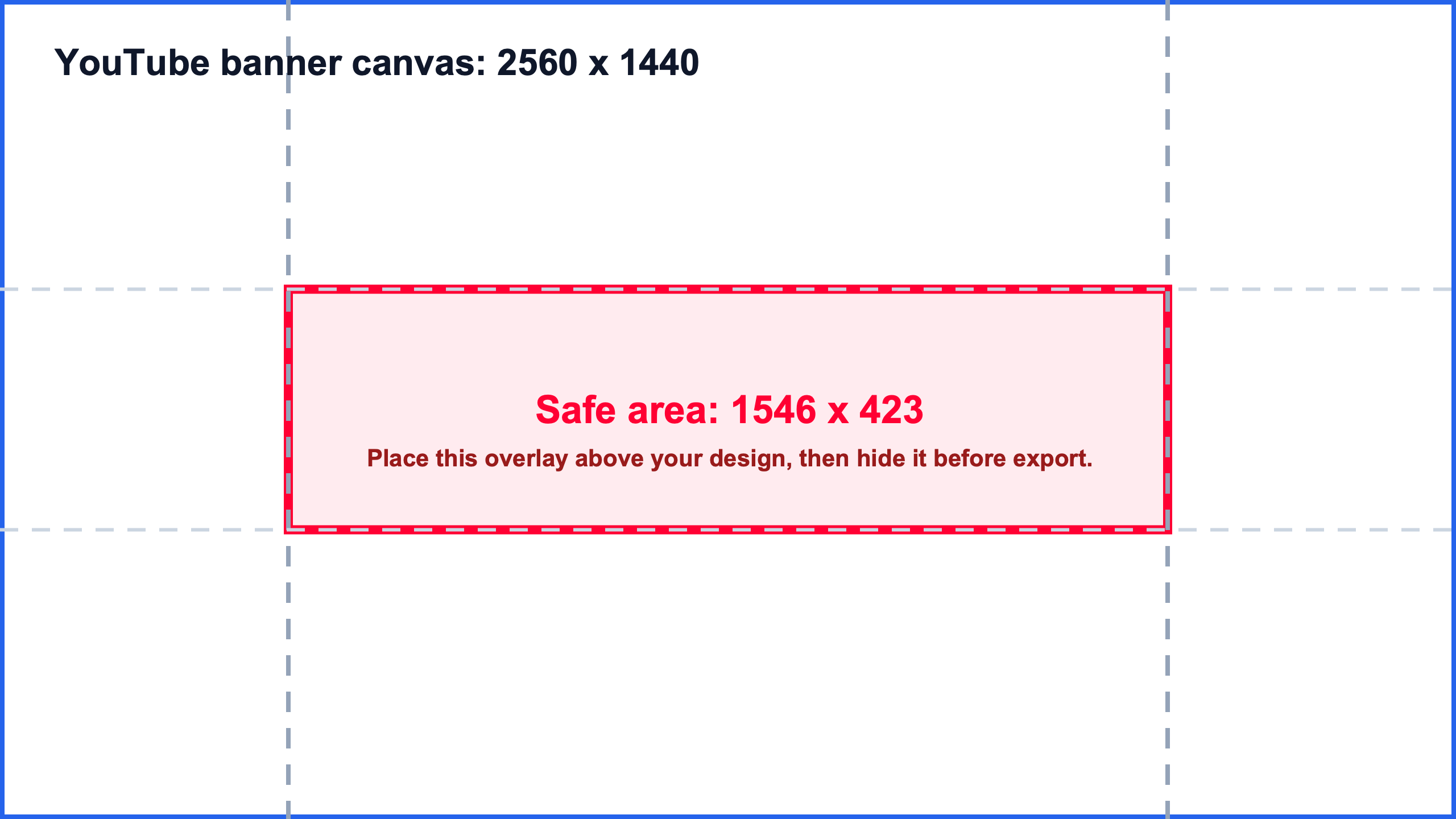
Need a transparent PNG overlay
Download the transparent PNG guide and layer it above the 2560 x 1440 banner draft.
Download PNG overlayExported banner dimensions are unknown
Check the final file width, height, ratio, format, and file size before upload.
Check exported fileWide export may not be YouTube-only
Route the file through the banner checker when it could be a LinkedIn, Facebook, Open Graph, or marketplace cover.
Route wide exportDevice crops still look risky
Compare mobile, desktop, tablet, and TV crop expectations before final upload.
Review device cropsPreview the YouTube banner safe area
Upload a channel banner and check whether text, logos, and calls to action sit inside the 1546 x 423 safe area on a 2560 x 1440 canvas. The image is previewed locally in your browser.
Upload a 2560 x 1440 banner, try the sample check, or download the template.
Asset routing shortcuts
Choose the right image workflow before editing again
If the exported file no longer fits this exact YouTube task, route it by publishing surface first. Use the image checker for raw file facts, the social checker for cross-platform reuse, the YouTube image hub for broad channel assets, the thumbnail text guide when the words fail small previews, or the Open Graph preview checker when the image belongs to a website share card.
Read an exported file
Image Size Checker
Use this when you already have a file and need width, height, ratio, file size, format, and the nearest publishing workflow.
Check image dimensionsRoute a social image
Social Media Image Checker
Use this when one export might become an Instagram, LinkedIn, Facebook, Open Graph, ecommerce, or creator image.
Open social checkerChoose the YouTube asset
YouTube Image Sizes Hub
Start here when the image might be a thumbnail, Shorts frame, banner, profile picture, watermark, podcast cover, or Community post.
Open YouTube Image Sizes hubFix readable thumbnail text
YouTube Thumbnail Text
Use this when the image passes dimensions but the hook is too long, text is too small, contrast is weak, or the timestamp covers key words.
Open thumbnail text guideCheck a wide banner
Banner Size Checker
Use this when the export is wide enough to be channel art, a cover photo, a profile header, a Page banner, or another social banner.
Open banner checkerPreview a website share card
Open Graph Preview Checker
Use this when the image is already attached to a page URL and the social preview crop, cache, or metadata needs checking.
Open Open Graph preview checkerRelated repair and reuse routes
Open the next task before redesigning the image
A valid image can still need a format choice, crop repair, text readability check, template source, broader YouTube asset route, wide banner checker, or marketplace-specific size check. Pick the next task from the actual publishing problem.
Thumbnail repair routes
Use these when a standard thumbnail already has a visible problem after export.
Choose thumbnail format
JPG vs PNG for YouTube Thumbnails
Use this when the thumbnail has photos, screenshots, logos, or text and the export needs a deliberate JPG or PNG choice before compression.
Convert thumbnail size
YouTube Thumbnail Size Converter
Use this when the file is square, vertical, 4:3, too small, or needs a clean 3840 x 2160, 1920 x 1080, or 1280 x 720 export.
Fix thumbnail text
YouTube Thumbnail Text
Use this when the dimensions pass but the hook is too long, text is too small, contrast is weak, or the timestamp area blocks key words.
Reusable asset routes
Use these when the image is becoming a broader creator, template, or marketplace asset.
Open templates
Image Size Templates
Use this when you need reusable safe-area overlays, SVG source files, PNG references, and public template download paths.
Choose YouTube asset type
YouTube Image Sizes
Use this when the image may be a thumbnail, Shorts frame, banner, profile picture, watermark, podcast cover, or Community post.
Check Whatnot image
Whatnot Image Size
Use this when a creator graphic is being reused for Whatnot seller profiles, cover images, show thumbnails, or listing photos.
Publishing decision hubs
Use these when a broad image question needs to become the right platform, upload, resize, or cross-platform route.
Choose social platform size
Social Media Image Sizes
Use this hub when one image may need Instagram, Facebook, LinkedIn, Open Graph, marketplace, ecommerce, or creator-platform guidance.
Run final upload checklist
YouTube Thumbnail Pre-upload Checklist
Use this when the YouTube thumbnail file is exported and needs a final dimensions, 16:9 ratio, file-size, format, and readability gate.
Convert 16:9 thumbnail size
YouTube Thumbnail Size Converter
Use this when a thumbnail draft is square, vertical, 4:3, too small, too large, or needs a clean 1280 x 720, 1920 x 1080, or 3840 x 2160 export.
Vertical cover and share-card routes
Use these when a thumbnail concept is being reused as a vertical cover or a website preview image.
Check Reel cover
Instagram Reel Cover Size
Use this when a Shorts frame or thumbnail concept becomes a 9:16 Reel cover and needs profile-grid crop checks.
Route social image
Social Media Image Checker
Use this when the same export might become an Instagram, LinkedIn, Facebook, Open Graph, ecommerce, or creator image.
Adapt share card
Open Graph Image Size
Use this when a thumbnail-like visual needs a 1200 x 630 website share-card export instead of a video thumbnail.
Next checker routes from this safe-area task
Route the finished banner file before reusing it on another platform
A YouTube channel-art draft often becomes a LinkedIn banner, Facebook cover, website share image, marketplace cover, or vertical social cover. Use the right checker before exporting one file for every placement.
Finished wide export
Open Banner Size Checker
Use the banner checker when the 2560 x 1440 safe-area draft becomes a final YouTube, LinkedIn, Facebook, or profile-header file.
Reused social creative
Open Social Media Image Checker
Use the social checker when the same wide artwork may move into Instagram, Facebook, LinkedIn, Whatnot, ecommerce, or creator-profile placement.
Website share-card reuse
Open Open Graph Image Size
Use the Open Graph image guide when a banner-like design must be rebuilt as a 1200 x 630 website share-card source before metadata work.
Live website preview
Open Open Graph Preview Checker
Use the Open Graph preview checker when a banner-like image is actually attached to page metadata and needs a live card preview workflow.
Vertical cover adaptation
Open Instagram Reel Cover Size
Use the Reel cover route when the banner concept is being cropped into a 9:16 social video cover instead of staying wide.
Search result decision card
If you searched for a YouTube banner safe area PNG, start with the overlay
The short answer is: the safe zone is 1546 x 423 px, centered inside a 2560 x 1440 YouTube banner. Use the transparent PNG when you need a guide layer, use the safe-area preview when you need to confirm crop placement, and use the template page when you need reusable source files.
youtube banner safe area png
Download transparent PNG
They want an overlay file, not a long explanation.
Download the transparent PNG overlay and place it above the 2560 x 1440 banner draft.
yt banner safe zone
Preview 1546 x 423 safe zone
They need the visible center rule fast.
Use 1546 x 423 px as the centered safe zone for text, logos, taglines, and calls to action.
1546 x 423 banner
Get safe-area template
They are checking what that dimension means.
It is the safe center band inside a full 2560 x 1440 YouTube channel art canvas.
PNG overlay chooser
Download the right 1546 x 423 safe-area PNG
If you searched for a YouTube banner safe area PNG, start here. Use the transparent overlay for an active design file, the white preview for a plain reference, or the dark preview when your banner artwork needs stronger contrast.
2560 x 1440 PNG
Transparent PNG overlay
Layering over an existing Canva, Figma, Photoshop, or browser-editor banner draft.
Place it above the design, keep text inside 1546 x 423, then hide the overlay before export.
Download PNG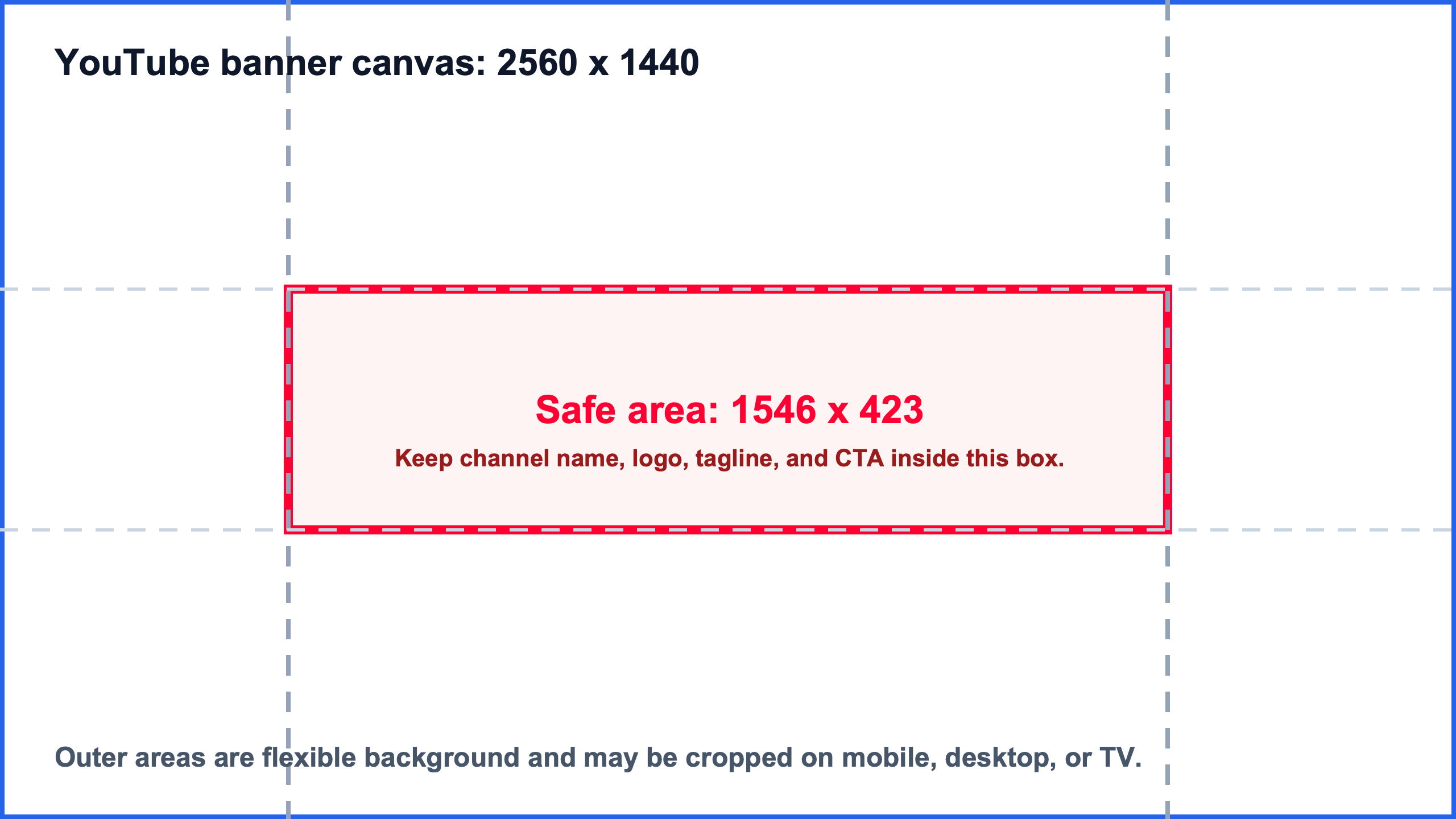
2560 x 1440 PNG
White PNG preview
A quick reference image, client handoff, or plain safe-zone example.
Use it to explain the center band before moving the real artwork into the safe area.
Download PNG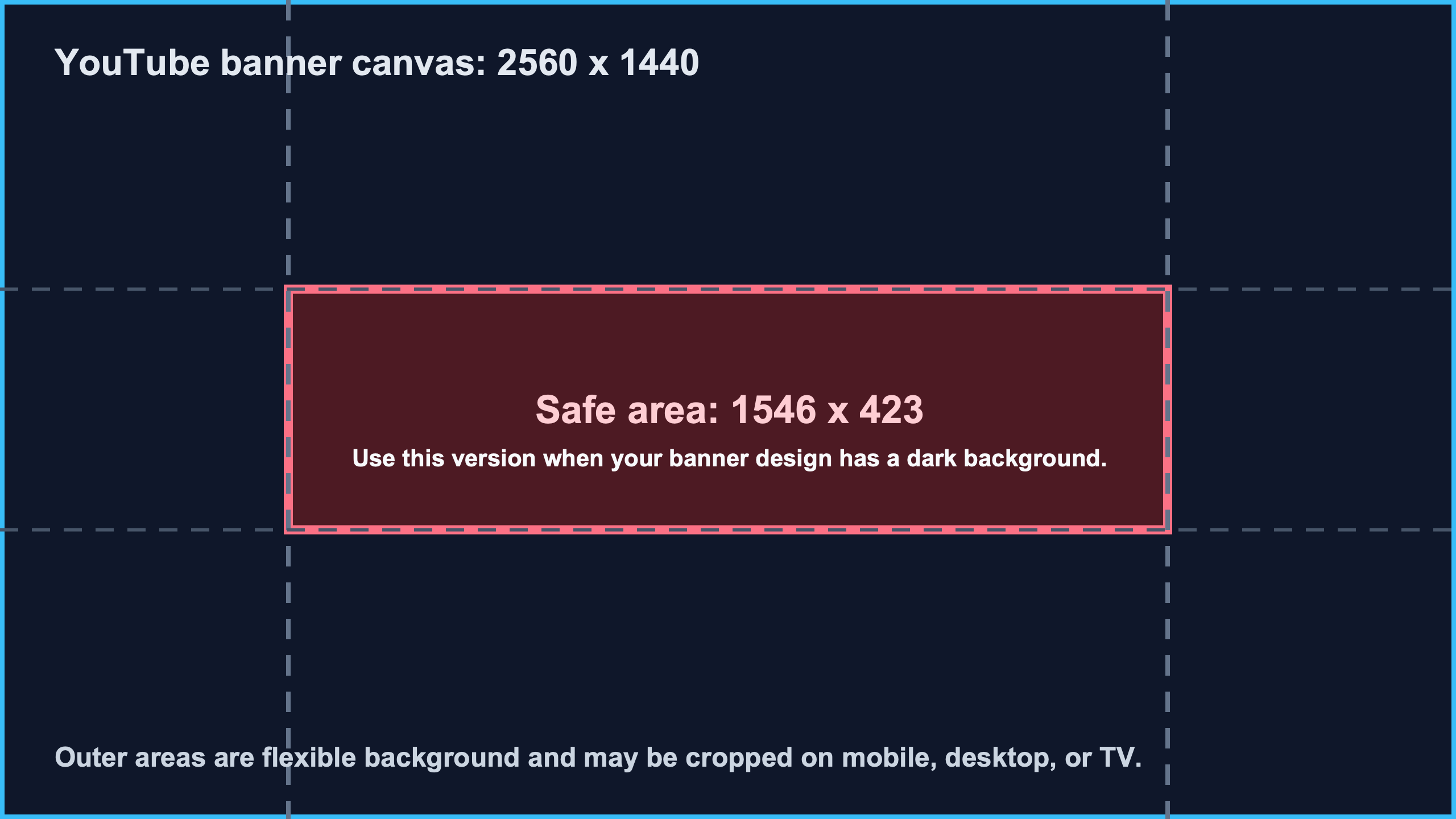
2560 x 1440 PNG
Dark PNG preview
Dark gaming, music, creator, or brand banners where a white guide is hard to inspect.
Check contrast against the safe-zone band before exporting the final 2560 x 1440 file.
Download PNGCheck wide exports before upload
Use this safe-area page to route wide files to the banner checker, generic dimension checker, social media checker, or Open Graph checker when a channel-art export is reused outside YouTube.
Public workflow references: ImageSizeKit core checker route map · ImageSizeKit checker workflow reference
Choose the correct YouTube image workflow
YouTube Image Sizes
Route broad YouTube image searches into thumbnail, Shorts cover, banner, profile picture, watermark, podcast, and Community post guidance.
Start here when the image is for YouTube but you are not sure which asset type it is.
Best for broad queries such as youtube image size, image size for youtube, youtube photo size, and youtube picture dimensions.
Check image dimensions online
Image Size Checker
Read width, height, aspect ratio, file size, format, orientation, and the nearest publishing workflow for an exported image.
Start here when you only have a file and need raw image facts before choosing a platform guide.
Best for broad queries such as image size checker, website image size checker, and thumbnail image size.
Check banner image size
Banner Size Checker
Route wide header, cover, channel art, profile banner, and website hero images before publishing.
Start here when the image is wide enough to be a channel banner, cover photo, or profile header.
Best for banner crop checks before moving into YouTube, LinkedIn, Facebook, or website preview pages.
Check social media image size before upload
Social Media Image Checker
Compare one exported image against Instagram, Facebook, LinkedIn, Open Graph, ecommerce, and creator workflows.
Start here when the same export may be reused across several social or marketplace surfaces.
Best for routing one image into Instagram, LinkedIn, Facebook, Open Graph, Etsy, Shopify, Whatnot, or YouTube pages.
Check Open Graph preview image
Open Graph Preview Checker
Check 1200 x 630 and 1.91:1 website share images before adding metadata or refreshing social previews.
Start here when the image will appear as a website or blog share card.
Best for separating image-file problems from page metadata, crawler access, and platform cache issues.
Wide banner routing decision card
A wide image is not automatically a YouTube banner. Use this decision card before resizing so a channel-art export can move to the banner checker, Open Graph preview checker, or generic image size checker when the final upload surface changes.
| Question | Dimension or workflow signal | Best route |
|---|---|---|
| Is this a YouTube channel banner? | The file is 2560 x 1440 or was exported from a YouTube channel-art template. | Check final banner file: Preview the 1546 x 423 safe area here, then use the banner checker for the final exported file. |
| Is this a reused social header? | The same wide graphic may be used for LinkedIn, Facebook, YouTube, or a profile header. | Route wide header: Use the banner checker first, then open the platform-specific crop guide. |
| Is this a website share image? | The file is close to 1200 x 630 or will be used as og:image metadata. | Preview share card: Use the Open Graph image guide and preview checker instead of treating it as channel art. |
| Is the file purpose unclear? | You only have a wide exported image or downloaded preview and do not know the final platform. | Read image facts first: Read the dimensions locally, then choose YouTube, social banner, Open Graph, or marketplace guidance. |
Wide banner reuse matrix
A YouTube banner safe-area file is often the first draft of a wider social header, cover image, Open Graph preview, marketplace asset, or template pack. Use this matrix before exporting the final file so the crop and dimensions match the destination, not just the original YouTube canvas.
| Reuse case | How to recognize it | Best route |
|---|---|---|
| YouTube channel art | The source canvas is 2560 x 1440 and important content must stay inside 1546 x 423. | Check banner file |
| LinkedIn profile or Page banner | The same wide graphic is moving to a LinkedIn profile background or company Page cover. | Check LinkedIn banner |
| Facebook cover photo | The artwork is being reused as a Facebook profile or Page cover rather than channel art. | Check Facebook cover |
| Website share card | The wide idea needs to become a 1200 x 630 Open Graph image for link previews. | Adapt to OG image |
| Live link preview | The image is already attached to a URL and the social preview crop or cache needs checking. | Preview share card |
| Reusable template source | The team needs safe-area overlays, SVG source files, or versioned template references. | Open templates |
| Marketplace cover reuse | The creator graphic is being repurposed for a Whatnot seller, show, cover, or listing image. | Check Whatnot image |
| Unknown wide export | The file is wide, but the final platform is not clear from the filename or canvas. | Read image facts |
Safe area rule
If losing an element would make the banner confusing, keep that element inside the 1546 x 423 center safe area. If an element is only decorative, it can sit near the edges. This simple rule prevents most mobile and desktop crop problems. For the full YouTube asset set, start from the YouTube Image Sizes hub. If you need to calculate another 16:9 canvas before exporting, use the aspect ratio calculator.
YouTube banner safe area query map
Short searches like banner safe and longer YouTube banner safe area template questions need different next steps. Use these routes to jump to the right check before exporting channel art.
| Search phrase | Direct answer | Next action |
|---|---|---|
| banner safe | Use the YouTube banner safe area rule: keep important text and logos inside the 1546 x 423 center band. | Jump on page |
| yt banner safe zone | Use the same YouTube banner safe zone rule: design a 2560 x 1440 banner and keep critical content in the centered 1546 x 423 region. | Jump on page |
| youtube banner safe area | Design a 2560 x 1440 banner, then keep critical content inside the centered 1546 x 423 safe area. | Jump on page |
| youtube banner safe area png | Use the downloadable safe-area templates and PNG preview references when you need a visible overlay before exporting channel art. | Jump on page |
| youtube banner safe area template | Download a 2560 x 1440 SVG template with the 1546 x 423 safe area marked. | Jump on page |
| youtube banner text cut off | Move the channel name, tagline, logo, or CTA toward the center safe area before exporting again. | Jump on page |
| youtube channel art safe area | Treat the outer canvas as flexible background and keep identity content in the center band. | Jump on page |
Download YouTube banner safe area templates
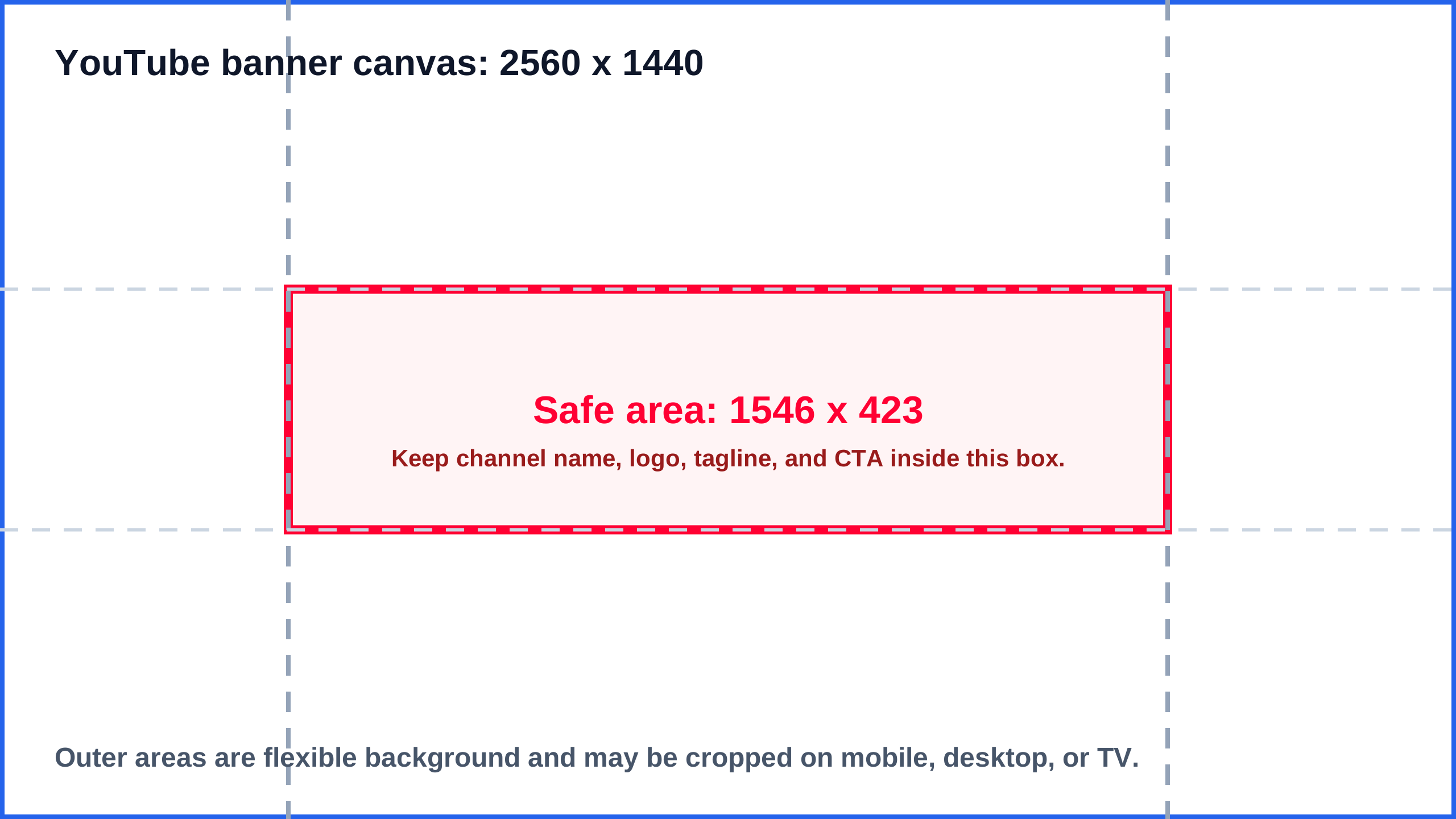
These 2560 x 1440 SVG templates mark the centered 1546 x 423 safe area. Use the white version as a plain guide, the transparent overlay inside a design file, and the dark version when you need contrast against a dark banner. Keep the final overlay hidden or removed before uploading the finished channel art. For a standalone template workflow, open the YouTube banner template page.
2560 x 1440 SVG
White SVG template
Use this white 2560 x 1440 template when you want a clean printable or reference guide.
Download template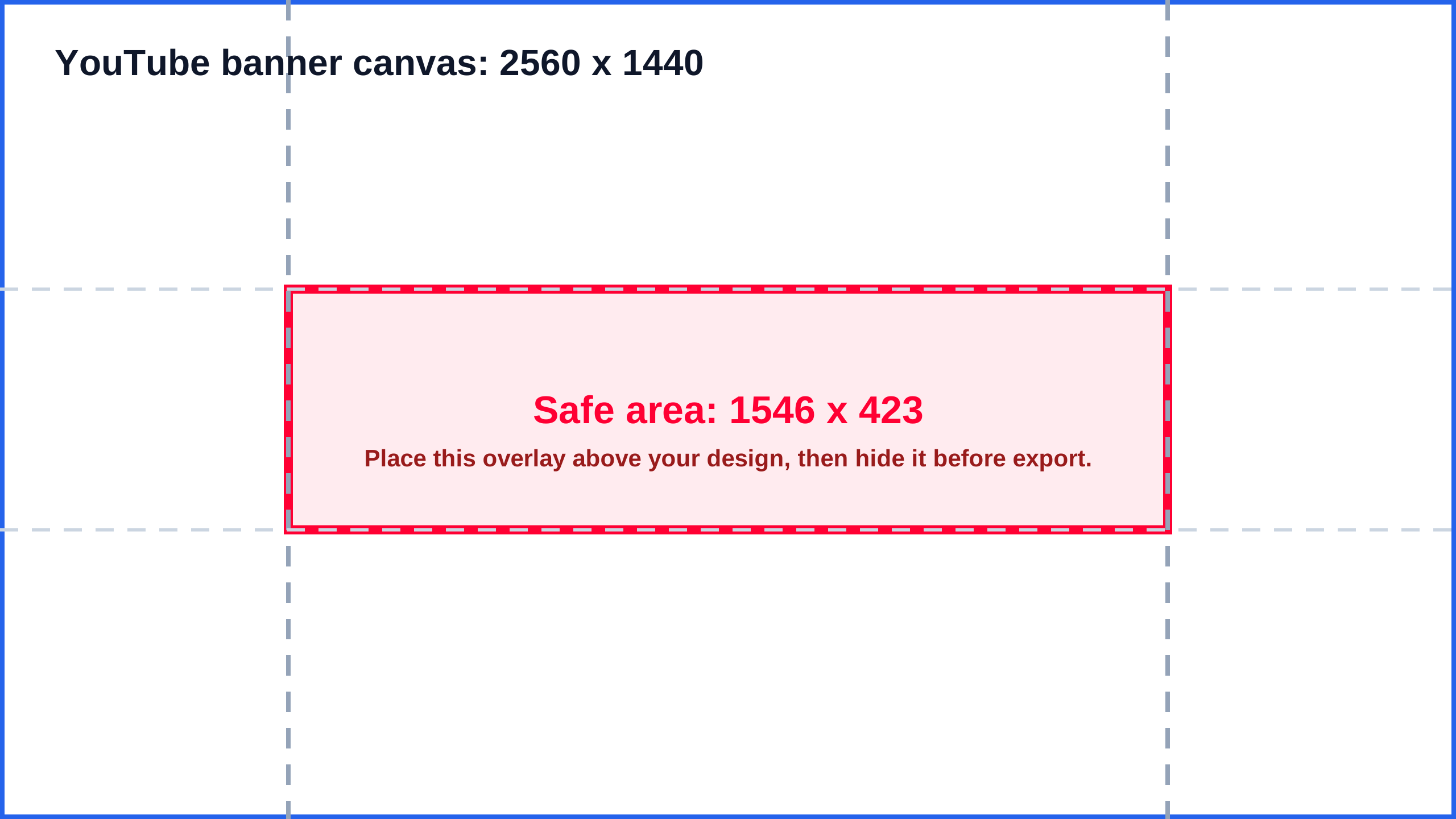
2560 x 1440 SVG
Transparent SVG overlay
Place this transparent 1546 x 423 safe area overlay above a Canva, Figma, or Photoshop design.
Download template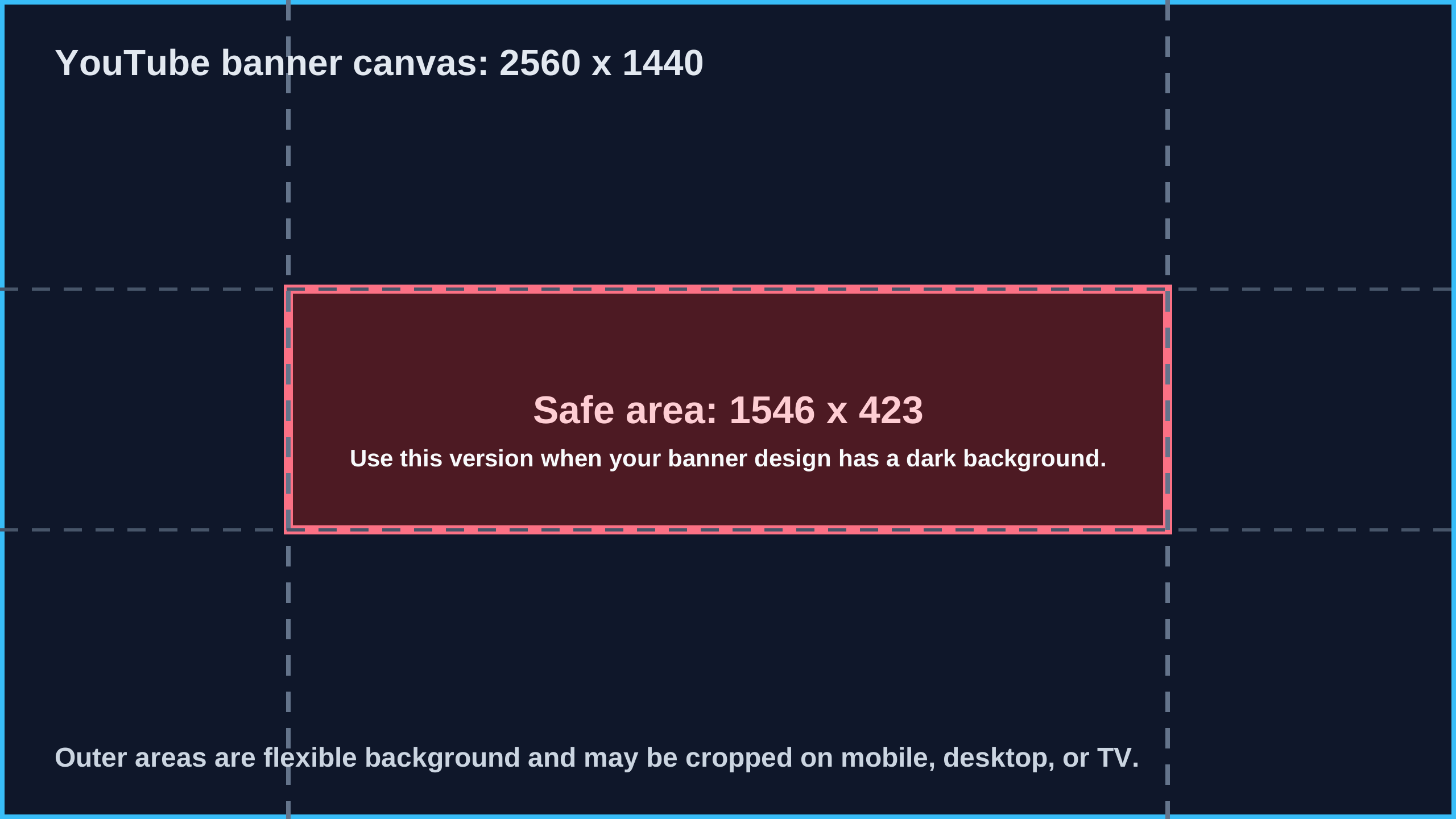
2560 x 1440 SVG
Dark SVG template
Use this dark guide when your YouTube banner design has a dark or high-contrast background.
Download templatePNG safe-area previews
Use these PNG files when you searched for a YouTube banner safe area PNG, need a quick reference image, or cannot import the SVG overlay into your editor. The transparent PNG is the best fit for layering over an existing banner draft.
2560 x 1440 PNG
White PNG preview
Download a 2560 x 1440 PNG reference image with the 1546 x 423 safe zone visible.
Download PNG2560 x 1440 PNG
Transparent PNG overlay
Use this PNG overlay when your editor cannot import the SVG guide layer cleanly.
Download PNG2560 x 1440 PNG
Dark PNG preview
Use this high-contrast PNG reference for dark creator, gaming, music, or brand banners.
Download PNGThe same SVG templates and PNG previews are available in the public ImageSizeKit template repository for creators who want to inspect, fork, or reuse the source files. The ImageSizeKit template hub collects the direct SVG downloads, public repository, versioned release, and future template packs.
After export, run the image size checker to confirm the finished file is still 2560 x 1440 and under YouTube's upload limit.
Safe area template workflow
The template is most useful when it becomes part of the design file, not just a reference image. Add it as an overlay, design under it, then remove or hide the overlay before final export.
Step 1
Download the 2560 x 1440 template
Use the SVG template as a safe-area overlay in Canva, Photoshop, Figma, or another design tool.
Step 2
Place critical content in the center
Keep the channel name, logo, tagline, upload promise, and calls to action inside the 1546 x 423 box.
Step 3
Upload a draft for local preview
Check whether important elements still sit inside the safe zone before the banner goes into YouTube Studio.
Step 4
Treat edges as flexible background
Use the outer canvas for texture, color, scenery, or non-critical artwork because device crops can remove it.
How each device treats the banner
| Device | Typical behavior | Design guidance |
|---|---|---|
| TV | Can show more of the full 2560 x 1440 canvas | Use background texture, patterns, or non-critical imagery |
| Desktop | Often shows a wide center strip | Keep the channel name and tagline centered |
| Mobile | Shows the narrowest practical view | Avoid side-aligned text and small logos |
| Tablet | Usually sits between desktop and mobile crops | Preview after upload before committing |
Safe area troubleshooting
If the banner fails after upload, do not redesign everything immediately. First identify whether the problem is placement, export size, text density, or device crop behavior. Most banner problems can be fixed by moving critical content into the center and treating the outer canvas as flexible art.
| Problem | Likely cause | Fix |
|---|---|---|
| Text disappears on mobile | The text is probably outside the 1546 x 423 center safe area. | Move the channel name, tagline, and CTA toward the center. |
| Banner looks empty on desktop | The center strip may not have enough visual weight. | Keep the main identity inside the center and use the edges as supporting background. |
| Logo looks too small | A logo that feels balanced on the full canvas can shrink too much in the visible crop. | Preview the banner at mobile width and simplify the mark if needed. |
| Export size is wrong | The design may have been exported from a resized frame or compressed preview. | Run the local image size checker before uploading the file. |
When the issue is the exported file rather than the layout, use the image size checker to confirm the file is actually 2560 x 1440 before opening YouTube Studio.
Do
Center the logo, channel name, and short tagline.
Avoid
Putting text on the far left, far right, top edge, or bottom edge.
Check
Preview the public channel on a phone after upload.
Current banner checker queue
This safe-area page can route wide creator images into the current ImageSizeKit checker queue. Use these routes when the file may be a channel banner, social cover, profile header, Open Graph image, or reusable website asset rather than a YouTube-only upload.
| Checker route | Use when | Open |
|---|---|---|
| Banner Size Checker | Check whether a wide exported banner fits YouTube, LinkedIn, Facebook, Open Graph, or profile header guidance. | Open checker |
| Image Size Checker | Start in the upload area and confirm the exported file is still 2560 x 1440, with the right ratio, format, and file size. | Open checker |
| LinkedIn Banner Size | Use this when the same wide header image may become a LinkedIn profile or company page banner. | Open checker |
| Facebook Cover Photo Size | Use this when the wide channel-art idea is being reused as a Facebook Page or profile cover photo. | Open checker |
| Open Graph Image Size | Use this when the banner-like image is meant for website link previews and needs a 1200 x 630 social card crop. | Open checker |
| Social Media Image Checker | Route the same wide image to the closest social, ecommerce, Open Graph, or creator image workflow. | Open checker |
| Open Graph Preview Checker | Use this when the banner-like image is really for a website preview card or link share image. | Open checker |
| Whatnot Image Size | Use this when a wide creator graphic becomes a marketplace cover, show thumbnail, or seller profile asset. | Open checker |
| Social image pre-upload checklist | Check crop, ratio, file size, alt text, metadata, and destination before publishing a non-YouTube banner. | Open checker |
Wide banner export next routes
After the YouTube safe area looks correct, choose the next route by the actual export job: reusable template assets, website share-card adaptation, or a final wide-banner file check.
Need reusable banner source files
Open template hub
Open the template hub for SVG overlays, PNG references, source files, and public template URLs.
Reusing channel art as a website card
Adapt to Open Graph
Switch from YouTube channel art rules to the 1200 x 630 Open Graph image guide before publishing metadata.
Checking a finished wide export
Check banner export
Use the banner checker when the file may be a YouTube, LinkedIn, Facebook, profile header, or Open Graph image.
YouTube banner safe area FAQ
What is the YouTube banner safe area?
The safe area is the 1546 x 423 pixel center region of a 2560 x 1440 YouTube banner where important text and logos are least likely to be cropped across mobile, desktop, tablet, and TV views.
What size is the YouTube banner safe area?
Use a 1546 x 423 pixel centered safe area on a 2560 x 1440 canvas. Keep the channel name, logo, tagline, and calls to action inside that area.
Why does my YouTube banner text disappear on mobile?
Mobile views crop the banner more aggressively. Text placed near the left, right, top, or bottom edge can disappear even when the full 2560 x 1440 design looks correct.
Should my YouTube banner have text?
Use text only if it remains readable in the center safe area. A short channel name or tagline is usually safer than a long sentence.
Can I use the same banner on every device?
Yes, YouTube uses one uploaded banner, but each device crops it differently. Design one image with a strong center and flexible outer background.
Related YouTube image pages
This safe-area page also acts as a routing bridge for template downloads, broader YouTube image selection, and cross-platform banner checks after the channel art export is ready. Use these routes when a wide image becomes a LinkedIn banner, Facebook cover, Open Graph card, social profile header, marketplace cover, or reusable design template.
Banner Size Checker
Use this route when the exported wide file is close to a YouTube, LinkedIn, Facebook, Open Graph, or profile-header target.
LinkedIn Banner Size
Use this direct bridge when channel art is being adapted into a LinkedIn profile or company Page banner.
Facebook Cover Photo Size
Use this when the wide export is being reused as a Facebook cover photo instead of a YouTube banner.
Open Graph Image Size
Use this direct bridge when a banner-like export is really a 1200 x 630 website share image.
Image Size Templates
Use this bridge when reusable SVG safe-area files, source assets, and public download URLs are needed.
YouTube Image Sizes
Use the YouTube hub when the banner belongs to a broader channel image workflow with thumbnails, Shorts, profile images, and Community posts.
Social Media Image Checker
Route finished wide exports to LinkedIn, Facebook, Open Graph, ecommerce, and other social workflows after the YouTube safe-area check.
Social Media Image Sizes
Use it when the wide export may be a cover photo, profile banner, Open Graph card, marketplace cover, or product image.
Whatnot Image Size
Use this when a wide creator graphic is repurposed into Whatnot seller, show, cover, or listing image placements.
YouTube Banner Size
Review the full channel art dimensions and export notes.
YouTube Banner Template
Download reusable 2560 x 1440 SVG safe-area templates.
Image Size Templates
Open the template asset hub for SVG downloads, source files, and release URLs.
Image Size Checker
Confirm the exported banner width, height, ratio, format, and file size locally in the upload checker.
Banner Size Checker
Check whether a wide exported banner fits YouTube, LinkedIn, Facebook, or Open Graph guidance.
LinkedIn Banner Size
Check profile and company-page banner crops when the same wide image is for LinkedIn.
Facebook Cover Photo Size
Check Facebook profile and Page cover crops when a channel-art idea moves to Facebook.
Open Graph Image Size
Use the 1200 x 630 guide when the banner-like image is really for a website link preview.
Open Graph Preview Checker
Check a live URL preview when the image is already attached to page metadata.
Whatnot Image Size
Check marketplace cover, show thumbnail, seller profile, and listing image reuse.
Aspect Ratio Calculator
Check 16:9 canvas sizes before designing.
Download Safe Area Templates
Use white, transparent, or dark 2560 x 1440 SVG safe-area guides.
Pre-upload Thumbnail Checklist
Use the same pre-upload habit for thumbnail files before publishing videos.
YouTube Image Sizes
Compare thumbnail, banner, and safe area requirements.
Social Media Image Sizes
Compare banner, cover, profile, Open Graph, and product image requirements across platforms.
Social Media Image Checker
Route an exported image to the closest social, ecommerce, Open Graph, or creator image workflow.