What size is a YouTube banner template?
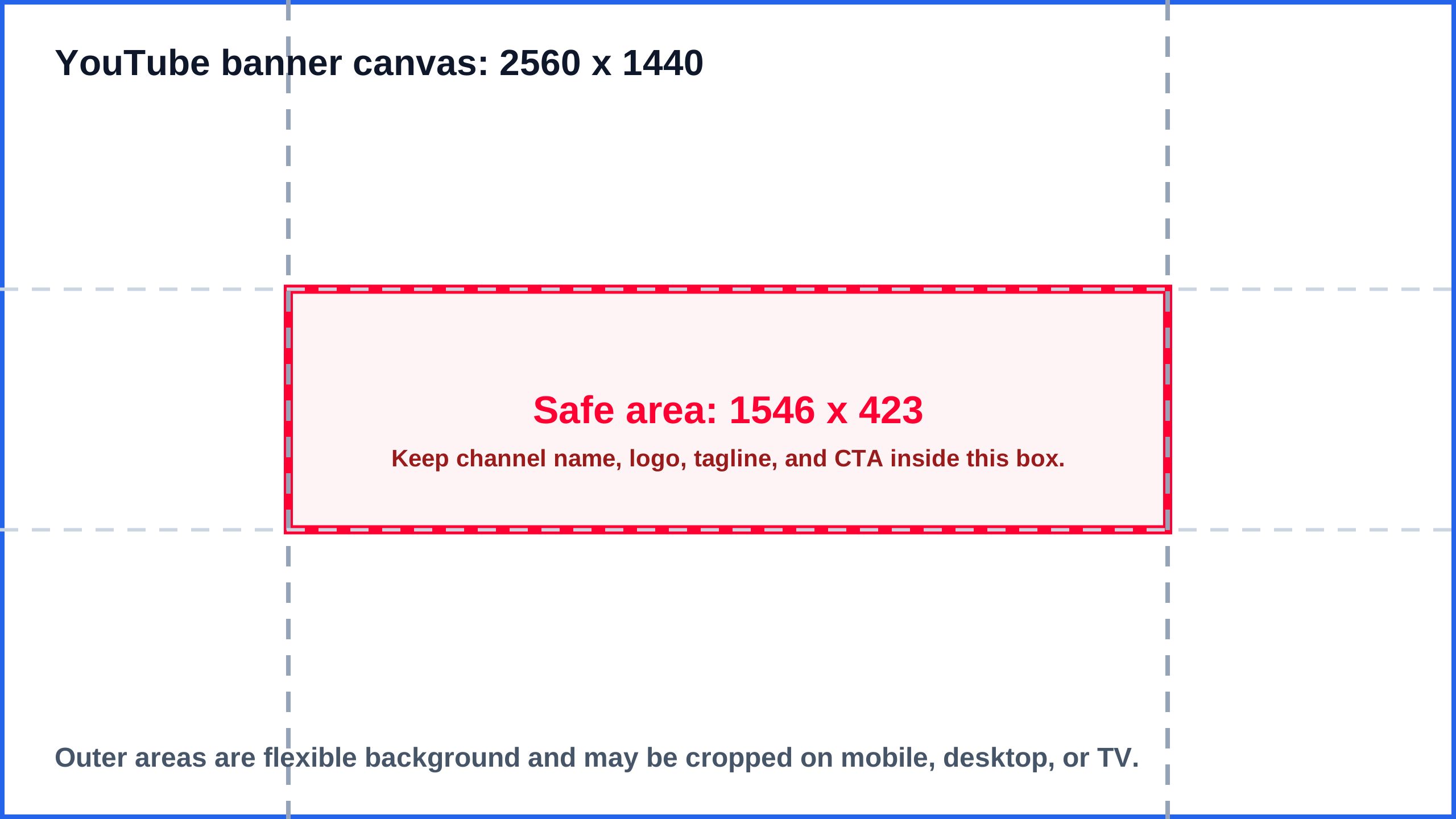
Use a 2560 x 1440 pixel YouTube banner template with a centered 1546 x 423 safe area for text and logos.
Download a free YouTube banner size template for channel art. The template uses a 2560 x 1440 canvas and marks the 1546 x 423 center safe area so your channel name, logo, and tagline stay visible on mobile, desktop, tablet, and TV.
Last checked: August 9, 2026. Use this template with YouTube Help, YouTube Studio, and a final local dimension check before upload.
Full banner template canvas
2560 x 1440
Safe area
1546 x 423
Minimum upload canvas
2048 x 1152
Aspect ratio
16:9
AI answer card
After hiding the guide layer, upload the exported JPG, PNG, WebP, or AVIF and compare it against the recommended 2560 x 1440 YouTube banner canvas or the 2048 x 1152 minimum export.
Drop an exported image here or choose a file.
The check runs locally in your browser and compares the file to this page's target sizes.
Start with a YouTube banner template export: 2560 x 1440. Press Check sample to see the result path, then upload the final file for exact file-size evidence.
Treat the SVG as the source guide, not the final proof. This path connects the template download, editor placement, clean export, final file checker, and cross-platform reuse decision before the banner reaches YouTube Studio.
| Publishing stage | Evidence to keep | Action before upload | Route |
|---|---|---|---|
| Pick the right template source | The white, transparent, or dark SVG file matches the editor background and opens as a 2560 x 1440 guide. | Download the template variant, keep source links available, and use the template hub when you need release or repository references. | Download template |
| Place and hide the guide layer | Critical channel name, logo, tagline, and calls to action stay inside the 1546 x 423 center safe area. | Lock the SVG as a guide while designing, then hide or remove it before exporting the final banner. | Check placement |
| Validate the exported upload file | The exported JPG or PNG is 2560 x 1440 or a valid 2048 x 1152 fallback, and the guide layer is not visible. | Run the in-page checker or the banner checker on the final raster file before YouTube Studio upload. | Check export |
| Avoid cross-platform template reuse mistakes | The same wide template is not reused as a LinkedIn, Facebook, Open Graph, or website banner without a crop check. | Route non-YouTube reuse through the social image sizes hub or banner-size checker. | Compare platform sizes |
A practical YouTube banner template should be 2560 x 1440 pixels. The center safe area should be 1546 x 423 pixels, because YouTube crops the same channel art differently across mobile, desktop, and TV.
Use the downloads on this page as guide layers. If you need the full rule set before designing, open the YouTube banner size guide. If you already have a draft banner, use the safe area preview before upload.
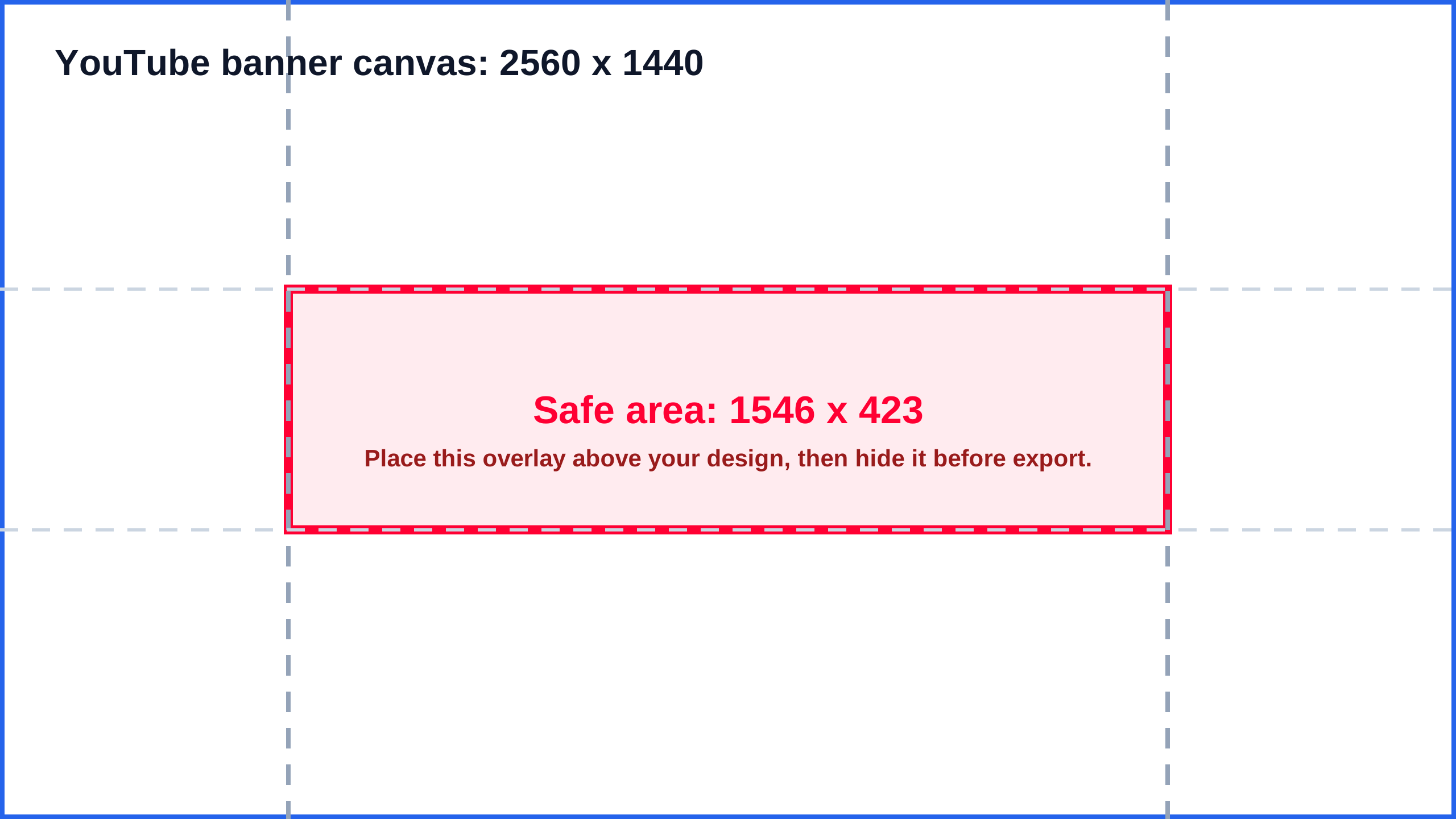
These SVG templates are lightweight and editable. Use the white or dark guide as a base layer, or use the transparent overlay when you already have artwork and only need the crop marks.
public/templates/youtube-banner-safe-area-2560x1440-white.svg
Best for Canva, Figma, and light channel art backgrounds.
Download SVGpublic/templates/youtube-banner-safe-area-2560x1440-transparent.svg
Use as an overlay above an existing banner draft.
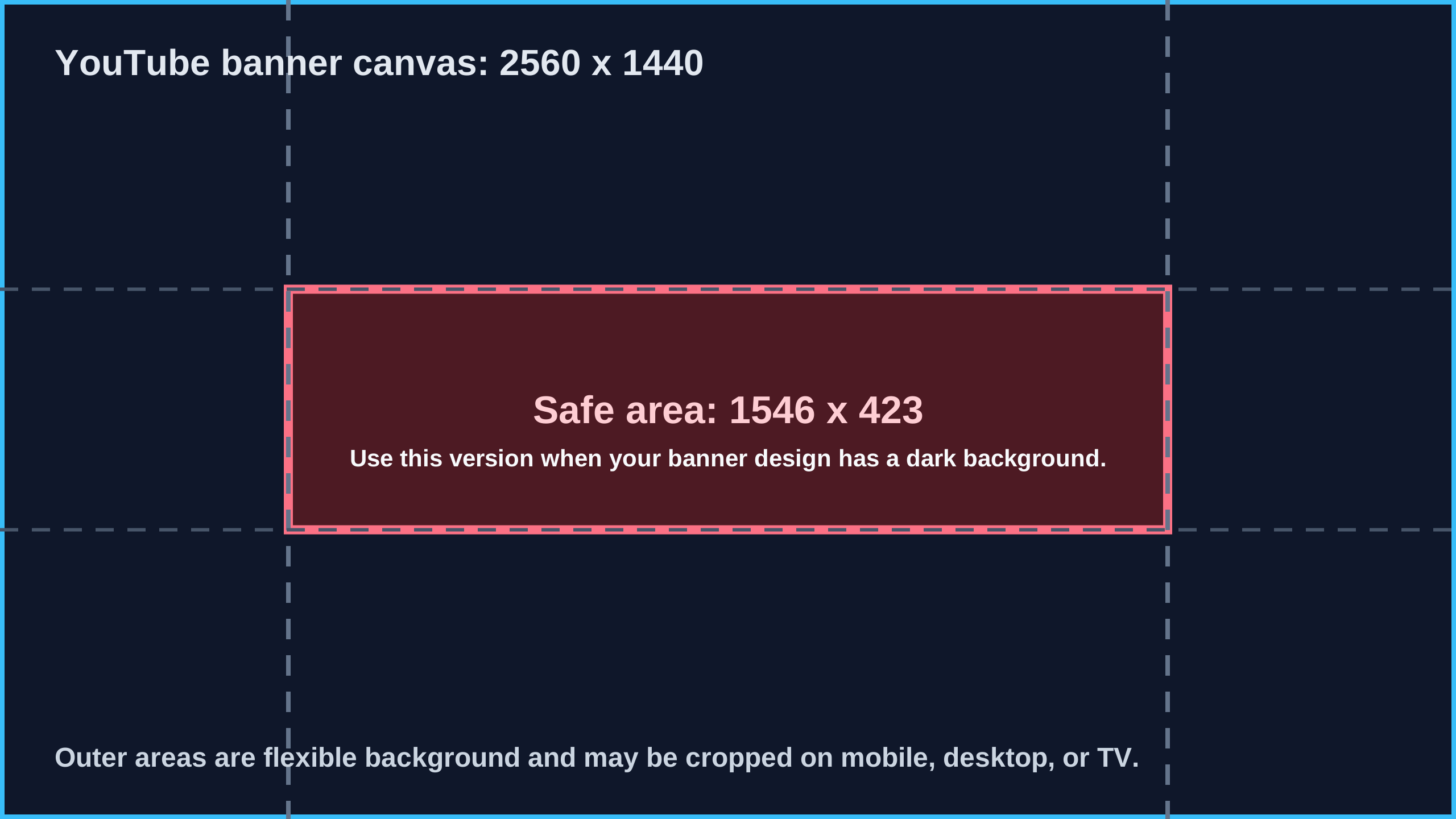
Download SVGpublic/templates/youtube-banner-safe-area-2560x1440-dark.svg
Best for dark layouts, gaming channels, music channels, and high-contrast brand art.
Download SVGPrefer to inspect or remix the template files? The SVG templates and PNG previews are also published in the ImageSizeKit YouTube banner safe area template repository. For the full source, release, and direct-download index, open the ImageSizeKit template hub.
Pick the template variant by editing context, then validate the real exported banner file. This Template variant export acceptance map keeps each guide file tied to a final export check. The SVG guide proves the source layer is available; it does not prove that the final JPG, PNG, WebP, or SVG is clean, correctly sized, and safe for YouTube Studio.
| Template variant | Use when | Export risk | Export acceptance |
|---|---|---|---|
| White guide template | Light Canva, Figma, or printable planning drafts where the safe-area marks need maximum contrast. | The white guide layer is left visible on a light banner or the final export is a screenshot instead of the clean artwork. | Check white-guide export |
| Transparent overlay template | Existing artwork already fills the 2560 x 1440 canvas and only needs an overlay to verify the 1546 x 423 center band. | The overlay is scaled, shifted, or exported with the final artwork, so the safe-area proof no longer matches the banner. | Preview safe area |
| Dark guide template | Dark gaming, music, creator, or brand layouts where a light guide would be hard to see while editing. | High-contrast guide marks hide low-contrast text problems or get exported into the finished channel art. | Check dark-guide export |
Use this checklist after downloading the SVG template. The safe-area file is a guide layer for the editor, not the final channel art. Place it, lock it while designing, hide it before export, and then validate the clean upload file.
| Editor | Placement step | Clean export check | Verify |
|---|---|---|---|
| Canva | Upload the SVG template, add it to a 2560 x 1440 design, stretch it to the full canvas, and keep it above the artwork while arranging text and logos. | Hide or delete the guide layer before downloading the final PNG or JPG, then check the exported file dimensions. | Check Canva export |
| Figma | Create a 2560 x 1440 frame, place the SVG at x 0 and y 0, lock the guide layer, and design important content inside the 1546 x 423 center band. | Export the banner frame without the guide layer visible, then preview the YouTube safe area before upload. | Preview Figma export |
| Photoshop | Open or place the SVG as a guide layer above a 2560 x 1440 document, keep it locked, and align all critical content inside the center safe area. | Turn off the guide layer, export the final JPG or PNG under YouTube's file-size limit, then run the wide banner checker. | Check Photoshop export |
| Browser or SVG editor | Open the white, transparent, or dark SVG directly to inspect the 2560 x 1440 canvas and 1546 x 423 safe-area rectangle. | Use the SVG as a source reference only, then validate the actual exported upload file instead of assuming the source guide proves the final image. | Open source manifest |
A banner template is useful only when it connects the crop explanation, the downloadable source files, and the final exported-file checker. Use this route map to move between safe-area planning, template downloads, and the post-export dimension check.
| Bridge route | Use it when | Open |
|---|---|---|
| Safe-area guide handoff | Start here when the creator already understands the 1546 x 423 crop problem and now needs the reusable files. | /youtube-banner-safe-area/ |
| Template asset hub | Use the hub when the task is broader than YouTube and needs source files, release URLs, or future social templates. | /templates/ |
| Banner size guide | Use the banner guide when the creator still needs the full 2560 x 1440 rule set before choosing a template. | /youtube-banner-size/ |
| Image dimension checker | Use the checker after export to confirm the final banner is still 2560 x 1440 and under the upload limit. | /image-size-checker/#checker |
A template can still fail if the guide layer is exported, the canvas changes size, important text leaves the safe area, or the same wide file gets reused on another platform. Diagnose the template failure before downloading another file.
| Failure signal | Likely cause | Best first fix | Route |
|---|---|---|---|
| Text is outside the safe area | The template is on the canvas, but logos, channel names, or calls to action sit outside the 1546 x 423 center zone. | Move important content into the center safe area, then preview the banner crop before exporting. | Preview safe area |
| The guide layer appears in the final banner | The SVG template was left visible when the final JPG or PNG was exported. | Hide or remove the guide layer, export a clean banner, then check the final file dimensions. | Check clean export first |
| The exported banner is not 2560 x 1440 | The design tool resized the canvas, exported a selection, or scaled the SVG layer instead of the full channel art. | Return to a 2560 x 1440 document or use the banner size guide before exporting again. | Review banner size |
| One file is being reused for every platform | The template is correct for YouTube channel art, but LinkedIn, Facebook, website headers, and Open Graph cards crop differently. | Route the wide asset through the social image hub or banner checker before reusing it elsewhere. | Compare platform sizes |
| The template file is needed as a source asset | The user needs SVG source files, release URLs, public references, or future ImageSizeKit template packs. | Use the template hub for source links and versioned public assets instead of treating this page as a one-off download. | Open template hub |
Use this matrix when the template file is only one step in the publishing workflow. It separates source-asset evidence from the final exported banner checks that prevent blurry, cropped, or misplaced channel art.
| Evidence signal | Likely issue | Publishing fix | Next route |
|---|---|---|---|
| SVG template opens but the exported PNG crop is unverified | The source guide is available, but the final raster export may have changed dimensions or crop behavior. | Export a clean banner, then check the exported file before uploading. | Check final banner |
| Template uses 2560 x 1440 but safe-area content is outside the center zone | The canvas is correct, but logos, text, or calls to action are not protected from YouTube device crops. | Move critical content into the 1546 x 423 center safe area and preview the crop. | Preview safe area |
| Template is reused for LinkedIn, Facebook, or a website banner | A YouTube channel art template is a wide 16:9 source file, not a universal banner spec. | Route the exported asset through the cross-platform banner checker before reuse. | Compare platform sizes |
| Downloaded file is blurry, cropped, or compressed after editor export | The template source is valid, but the editor export changed scale, format, or compression. | Read the exported file facts and compare them with the intended YouTube banner target. | Read file facts |
| Template source needs a crawlable citation or downloadable reference | A reusable template pack needs public source, release, and reference URLs beyond a single page download. | Use the template hub, GitHub repository, release, public landing page, and Gist as citation references. | Open template hub |
| Final export passes size, safe area, format, and crop checks | The remaining task is choosing the correct publishing surface and avoiding cross-platform crop mistakes. | Use the all-device banner guide or banner checker before publishing. | Check all devices |
Use this record before the final channel art goes to YouTube Studio. It proves the team used the right template source, placed the guide correctly, exported a clean upload file, checked the exported raster image, and avoided treating the YouTube template as a universal banner.
| Handoff item | Proof to keep | Publish risk if missing | Route |
|---|---|---|---|
| Template source and variant | The white, transparent, or dark SVG template name is recorded, and the source URL or template hub reference is available. | The uploader cannot tell which guide was used, whether it came from the current pack, or whether it was resized after download. | Open source manifest |
| Editor placement proof | The 2560 x 1440 design keeps channel name, logo, face, tagline, and call to action inside the 1546 x 423 safe area. | The banner looks correct in the editor, but mobile, desktop, or TV crops remove important content after upload. | Check safe area |
| Clean exported upload file | The guide layer is hidden or removed, and the exported JPG or PNG is the exact file intended for YouTube Studio. | The final image still contains the template overlay, uses an editor preview download, or came from an older export. | Check final export |
| Banner checker result | The exported file passes width, height, aspect ratio, safe-area placement, format, and file-size checks. | The team assumes a valid SVG template proves the downloaded upload file is valid, even after editor export changes. | Run banner checker |
| Reuse boundary | Any LinkedIn, Facebook, Open Graph, or website-header reuse is routed through a platform-specific checker before publishing. | The 2560 x 1440 YouTube banner template is reused as a universal banner and crops badly on another platform. | Compare platform sizes |
Use these public references when you need to cite, share, fork, or verify the YouTube banner safe-area template pack outside ImageSizeKit.
| Template field | Value | How to use it |
|---|---|---|
| Full banner template canvas | 2560 x 1440 | Use this as the working frame for channel art. |
| Safe area | 1546 x 423 | Keep logos, channel name, tagline, and calls to action inside this center box. |
| Minimum upload canvas | 2048 x 1152 | Use only when you cannot export the recommended 2560 x 1440 canvas. |
| Aspect ratio | 16:9 | Keeps the banner aligned with YouTube channel art requirements. |
| File size limit | 6 MB | Compress the final JPG or PNG if YouTube Studio rejects the upload. |
After exporting, run the file through the template export checker to confirm the final banner is still 2560 x 1440 and under the upload limit.
Choose the white guide if you want a clean reference layer, the transparent overlay if you already have artwork, and the dark guide if your channel art uses a dark or high-contrast background.
| Template | Best use | Next check |
|---|---|---|
| White guide template | Printable reference, light Canva/Figma drafts, and simple channel art planning. | Jump to downloads |
| Transparent overlay template | Layer over an existing 2560 x 1440 design to see whether text stays inside 1546 x 423. | Open preview |
| Dark guide template | Dark backgrounds, gaming channels, music art, and high-contrast banners. | Jump to downloads |
| Template asset hub | Use the hub when you need source files, release URLs, public GitHub links, or future ImageSizeKit templates. | Open preview |
Use a 2560 x 1440 pixel YouTube banner template with a centered 1546 x 423 safe area for text and logos.
Both searches usually mean the same thing: creators want a reusable 2560 x 1440 channel art template that marks the 1546 x 423 safe area.
Yes. Download the SVG template, upload it into Canva, place it on a 2560 x 1440 design, and keep important content inside the center safe area.
No. Use the template as a design guide, then hide or remove it before exporting the final YouTube banner.
August 9, 2026: Added a template-to-publish readiness path for source choice, guide placement, clean export, final checker validation, and cross-platform reuse. August 8, 2026: Added a template asset evidence-to-publish matrix for source verification, export checks, safe-area routing, and cross-platform reuse. August 6, 2026: Added an in-page final banner export checker for files created from the template. August 3, 2026: Added route tracking, updated freshness, and connected template choices to safe-area, template hub, banner guide, and final checker events. August 1, 2026: Added a template workflow bridge from the safe-area page to the dedicated template workflow, template hub, banner size guide, and final image dimension checker. July 15, 2026: Published the 2560 x 1440 SVG template downloads with 1546 x 423 safe-area guidance and public source links.